It has been a while since our last update, but the wait is over, we are thrilled to announce the release of BeamNG.tech v0.39! This update brings a host of powerful new features and quality-of-life improvements designed specifically to support researchers, developers, and simulation engineers.
Highlights of this release include a brand-new native C++ ROS 2 integration, which allows for high-performance, direct data pipelines, as well as new Model Context Protocol (MCP) support for seamlessly connecting AI agents and external tools to the simulator. We have also completely overhauled our Adaptive Cruise Control and Vehicle Platooning systems, alongside introducing a comprehensive new Traffic Signals API and helpful safe_spawn placement features accessible via BeamNGpy.
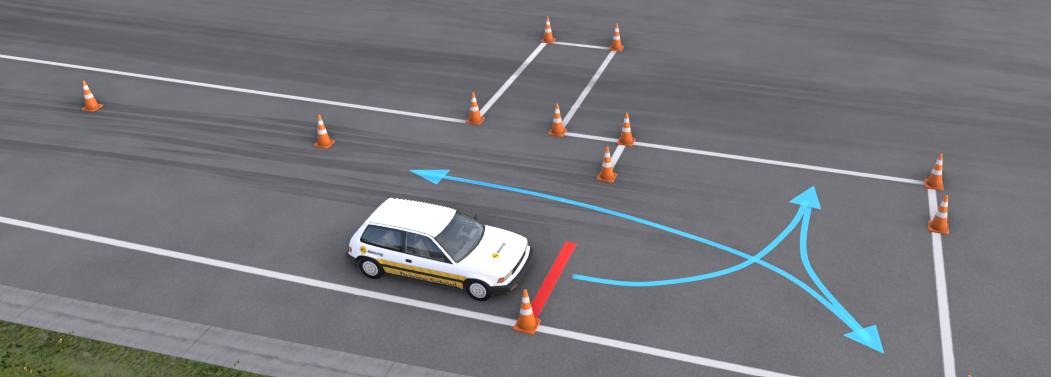
For those focused on instruction and assessment, we have added a Driver Training example experience to the Quick-Start Experiences (discover menu). This features a compact driving-school proving ground with cone courses and parking exercises, which also serves as an excellent template for building your own custom training missions.
On the tooling and workflow side, we have expanded the parameters in our Template Car Generator for even greater vehicle customization, and added a highly-requested Vehicle Signal Logger directly to the World Editor. Simulation and sensor accuracy have also seen vital updates, including improved OpenDRIVE import reliability in Road Architect and a new camera option for rendering translucent materials in depth images. Additionally, our MATLAB/Simulink bridges have been fully upgraded with support for R2024b, and we have enabled the Lua sandbox by default to ensure a more secure environment against malicious code.
We strongly encourage you to check out the BeamNG.drive patch notes to get the full scope of what’s new, many of these updates directly benefit BeamNG.tech as well. You can read the BeamNG.drive patch notes here.
Here’s a quick look at what’s new:
BeamNGpy
- Added
safe_spawnandclingparameters to vehicle placement and teleport functions.safe_spawnplaces vehicle on ground, avoiding collisions/air/underground (default True for most functions).clingis an alias forsafe_spawn, for backwards compatibility.- Both supported in:
Scenario.add_vehicle,BeamNGpy.vehicles.spawn,Vehicle.teleport, andBeamNGpy.teleport_vehicle.
- Scenario API improvements
ScenarioApi.teleport_objectnow supportscling(snap to ground) andoffset(z offset), matchingDebugApishape teleport functions.Scenarionow errors if modified aftermake()but beforeload(), to prevent silent failures.
- Platooning
- Added launch_platoon functionality
- Simplified usage, leveraging its improved flexibility
- Added
set_avoid_carsto the Vehicle AI API - Adaptive Cruise Control
- Simplified usage, reflecting the changes made in the Lua
- Added
change_speedto the Vehicle ACC API
- Any missions can now be loaded through BeamNGpy, no matter its unlock requirements.
- Fixed a race condition during scenario start which could cause invalid scenario state.
- Optimized scenario loading performance.
- Added a traffic signals API
- Added a BeamNGpy traffic signals API (
bng.traffic_signals) that reads and controls level traffic signals from the Traffic Signals Editor /signals.jsondata via BeamNG.tech. A loaded level with signal data is required. - Lists active signal instances (name, state, action, controller/sequence ids, position), reads a single instance’s live state including direction, and returns the navgraph map-node signal snapshot. Also exposes the same instance, controller, and sequence data used by the Traffic Signals Editor and
signals.json(including durations and phases), plus a timing snapshot with runtime sequence step fields.get_traffic_lightreturns a vehicle pose facing a signal for teleport setups. - Live control supports forcing a signal to a controller state with
set_instance_strict_state(or clearing the override), and changing a controller state’s Duration withset_controller_state_duration(same as the editor;-1= infinite). Duration changes apply live and reset the signal timer; they do not writesignals.jsonunless saved in the editor.
- Added a BeamNGpy traffic signals API (
- Improved OpenDRIVE import in Road Architect
- Improved OpenDRIVE import reliability in Road Architect, including crest-curve handling, safer terrain conforming, and whole-network terraform when no road group is selected.
- Camera: optional translucent surfaces in depth
- Added a
Render Translucents In Depthoption (Sensor Configuration Editor / camera sensor config). When enabled, translucent materials (e.g. glass) are treated as opaque for the depth pass only, so depth no longer “sees through” them. Colour output is unchanged. Off by default; may increase cost because depth uses an extra pass.
- Added a
- Breaking change in VehiclesApi.get_available
Fixed functionVehiclesApi.get_available: it now behaves as described in the documentation. Note that existing code needs to be updated: You don’t need to extract thevehicleskey from the function return value anymore to get the dict of available vehicles. - Added Vehicle Signal Logger API
Vehicle.logging now drives the new Vehicle Signal Logger editor (start/stop CSV logging, optional editor config CSV); the old JSON logger API is removed.
ROS
- Native ROS 2 Integration
BeamNG.tech now includes a native C++ ROS 2 integration in addition to the existing BeamNGpy-based ROS 2 bridge. It is not a replacement, the BeamNGpy integration remains fully supported. The C++ path is a separate option for users who want a faster connection between BeamNG.tech and ROS 2.
Unlike the BeamNGpy-based bridge, this integration does not rely on Python but is a native library that BeamNG.tech loads directly. You still need a ROS 2 environment on the same machine and operating system as BeamNG.tech, but you do not need a Python environment or BeamNGpy for the ROS 2 link itself.
It also comes with a complete UI inside the World Editor, to manage all vechiles and sensors directly.
This first version is available on the cpp branch of the beamng-ros2-integration repository on GitHub. Pre-built releases and detailed setup, compatibility, and usage instructions are documented in that branch’s README. Because this is an early release, some bugs and rough edges may still remain. Feedback and issue reports are welcome.

Headless Mode
- Fixed mission fade out.
Linux
- Fixed a crash if the license key path (
tech.key) is a directory instead of a file.
Sensors
- Added camera sensor option to render transluscent materials in the depth image
- Added missing Camera sensor function
set_up.
Lua API
- Enabled the Lua sandbox by default.
This sandbox helps to protect you against external malicious code and used to be opt-in for BeamNG.tech, now it is opt-out. Users with a valid license can disable the sandbox with the-disable-sandboxcommand-line option. Read the Security section of the BeamNG.tech documentation for more information.
Adaptive Cruise Control
- Reworked Adaptive Cruise Control
- More comfortable and robust behaviour
- Better leader detection and tracking
- Improved adaptability in different vehicles and inclines
- Improved ease of use with new function namings
- More realistic input override handling
Vehicle Platooning
- Reworked Vehicle Platooning
Reworked Vehicle Platooning to rely on the reworked Adaptive Cruise Control, inheriting all of its improvements. Please refer to the documentation for the full details of the new platooning.- Changed extension and function names to improve ease of use
- Various usages have been changed to make platooning quicker to work with
- Platooning features have been expanded to improve flexibility
World Editor
- Vehicle Signal Logger (new)
Added a new Vehicle Signal Logger (VSL) in the World Editor for selecting, filtering, and logging vehicle and sensor signals. Replaces the older Log Vehicle Stats app, which has been removed. Works alongside co-simulation without depending on the co-simulation signal editor. Includes reliable signal discovery, sensor list handling, and stable sensor readout during logging and co-simulation.
- Improved co-simulation signal editing and sensor readout
- Improved co-simulation signal discovery, selection, and sensor readout in the World Editor. Signal list updates stay in sync when categories or vehicles change, and select/unselect-all applies after the filtered list rebuilds. Live sensor configs sync into the co-simulation signal editor. Coupling readout is guarded when sensor controllers are missing, with more reliable Advanced IMU binding during co-simulation.
- Improved co-simulation signal discovery, selection, and sensor readout in the World Editor. Signal list updates stay in sync when categories or vehicles change, and select/unselect-all applies after the filtered list rebuilds. Live sensor configs sync into the co-simulation signal editor. Coupling readout is guarded when sensor controllers are missing, with more reliable Advanced IMU binding during co-simulation.


Vehicles
- Template Car Generator
Added more parameters to the template car generator including:- Ride height (this does not change the suspension travel, instead lifting the body from the suspension subframe)
- Spring rate
- Damping
- Sway bar rate
An initial implementation of yaw, pitch, and roll inertia adjustments has been implemented as well.
The current implementation will create unstable results if targets that are too ambitious are set. There currently is a fairly narrow range of viable targets that heavily depends on the geometry and mass of the vehicle.

Licensing
- Fixed license checking in directories with non-ASCII characters.
Driver Training
- Example mission for driver training
Added a Driver Training example experience to the Quick-Start Experiences (discover menu). A compact driving-school proving ground with cone courses and parking exercises. Also serves as a template for building your own training missions.

MATLAB/Simulink
- Updated MATLAB/Simulink examples for R2024b
- Updated MATLAB and Simulink examples and models for R2024b, including the combined demo/model, FMI 2/3 examples, and the BeamNG interface. MATLAB examples now use the default renderer.
Tools
- Added Model Context Protocol (MCP) Support for connecting AI agents to BeamNG
- MCP Server can be enabled under Options > Advanced > Enable MCP server.
- This allows external tools and LLM agents (e.g. Cursor) to query and control the simulator.
- The server is exposed under
http://127.0.0.1:29292/mcpand uses MCP protocol version 2025-11-25 (Streamable HTTP). - If you have Node.js installed, you can use MCP Inspector with
npx @modelcontextprotocol/inspectorto explore the server’s capabilities interactively.